Infrahub branching deep dive: inside the graph, the costs, and the limits
What an Infrahub branch really is, what it costs, and where it stops.
Infrahub branching deep dive: inside the graph, the costs, and the limits
A source of truth is critical infrastructure. Automation reads it all day, so a wrong value in it becomes a wrong configuration on a device. Without branches, every edit lands live: a half-done migration, a maintenance plan and a test all share the database that production automation reads. Infrahub has native, Git-like branches for this data. I opened its graph and measured each step of a branch's life to see what "Git-like" really means.
A migration or a maintenance change should be a change that you prepare, review and check before it reaches the data, not a set of manual edits. I have worked a lot with NetBox, and this is the part we always had to build around it. In the past we made it work with Git: the change lived in a repository, a merge request carried the review, and a pipeline wrote the result into NetBox. Then came NetBox Branching, the extension that adds branches to NetBox, and I wrote a plugin on top of it, netbox-change-control, for policy-driven change control and mandatory review. Both ways work, but neither is always simple.
Infrahub answers this need, and elegantly. Branches are native: you branch, you change the configuration, you open a proposed change, checks run, a reviewer approves, you merge. A custom check can block a change that breaks a rule, like CI on a GitLab merge request. But a source of truth is a database, not a Git repository, so "Git-like" hides real engineering choices. I wanted to understand them before trusting them, and to gate a real maintenance change with a check. A second post uses the same lab to trace service dependencies: Which services sit behind this router?
Changelog
- 2026-11-04: I added the section Bugs found along the way.
- 2026-10-30: I added the section Rollback: what if I messed up?.
Tested on Infrahub 1.11.9
All tests in this post ran in October 2026 on Infrahub 1.11.9, the current release at the time of writing: Community edition, release compose file, Neo4j 2026.05.0 Community, 4 API workers and 2 task workers.
TL;DR
- A branch is a filter, not a copy. Values hang on edges tagged with a branch and a time range; creating a branch writes one node and one relationship. Nothing is overwritten, and nothing is trimmed.
- Creating and reading a branch are cheap. About half a second of work to create, whatever the data size, and reads cost the same as on
main. - The cost is in the life of the branch. 16 to 43 s per merge and 16 to 28 s per delete.
- The Git words do not mean the Git things. No commits, one level of branches, "latest value wins" merges, and a rebase that moves a timestamp.
- Rollback is a change forward. There is no revert: you rebuild the old state from the history on a new branch, review it and merge it.
- Custom checks work like CI on a merge request: a Python check blocks any change that breaks one of your design rules, before it reaches
main. - The free Community edition fits a lab or a network of up to about 1,000 devices. For a large or critical network, enforced approvals and high availability need the Enterprise edition.
The lab
All the tests and measurements ran on a lab built for this post. It runs the Infrahub release compose file with the OpsMill demo data, plus a small BGP backbone schema of my own, Net: routers, interfaces, inter-site links, BGP sessions and application services. A script generates sites of 2 P routers, 4 PE routers and 1 route reflector (RR), for two graph sizes: 49k nodes (small) and 151k nodes (large). The lab README has the full details: containers, schema, data steps, scripts and raw results.
How a branch is stored
Before the numbers, the model, because it explains all of them.
A graph database in one minute
If you have only used relational databases, here is the vocabulary. Neo4j is a property graph database. It stores nodes (also called vertices), which carry one or more labels and a set of key-value properties, and relationships (edges), which always have one type and one direction, and can carry properties too. There are no tables and no foreign keys: a relationship is a record that points directly at its two nodes, so following it is a pointer hop, not a join through an index. Queries are written in Cypher, where you draw the pattern you look for: (node)-[:TYPE]->(other).
This is the textbook way to model a network in a graph: one node per router, one edge per BGP peering, the attributes as properties. Infrahub does not store data like that, and the difference explains everything about its branches.
Vertices and edges
Infrahub does not store an object as one Neo4j node with properties. It splits it into several vertices: one for the object, one per attribute, one per value, and a middle vertex for each relationship. And every edge carries the versioning: the branch that wrote it, when it became valid (from), when it stopped being valid (to), and a status. Here is the router pe-par-01 as Infrahub stores it, with two of its attributes and one of its relationships:
All vertex labels, edge types and edge properties
| Vertex | Role |
|---|---|
Root |
One vertex that anchors the graph |
Branch |
One per branch, with its name and branched_from timestamp |
Node (also labelled with its kind, for example NetDevice) |
The object, with its uuid |
Attribute |
One per attribute of the object, for example status |
AttributeValue |
The value itself, shared between all attributes that hold the same value |
Relationship |
The middle vertex between two related objects |
Boolean |
Flags such as is_protected |
The edges carry the links: IS_PART_OF (object to root), HAS_ATTRIBUTE (object to attribute), HAS_VALUE (attribute to value), IS_RELATED (object to relationship to object), plus metadata edges such as IS_PROTECTED, HAS_SOURCE and HAS_OWNER. Every edge carries these properties:
| Edge property | Meaning |
|---|---|
branch |
The branch that wrote the edge |
branch_level |
1 for main and the global branch, 2 for a user branch |
from |
When the edge became valid |
to |
When it stopped being valid, empty while it is current |
status |
active or deleted |
from_user_id, to_user_id |
Who opened and who closed it |
Values are de-duplicated: in the demo data, 27,019 attributes point to only 3,455 distinct AttributeValue vertices. Attributes that hold the same value, with the same flags, share one vertex.
How a branch reads
A node does not belong to a branch. An edge does, for a time range. A query on a branch keeps an edge when:
- it is on
main(or the global branch) and was valid at the branch'sbranched_fromtime, or - it is on the branch itself and is valid now,
and when several edges compete for the same link, the one with the highest branch_level wins, then the most recent from, then active before deleted.
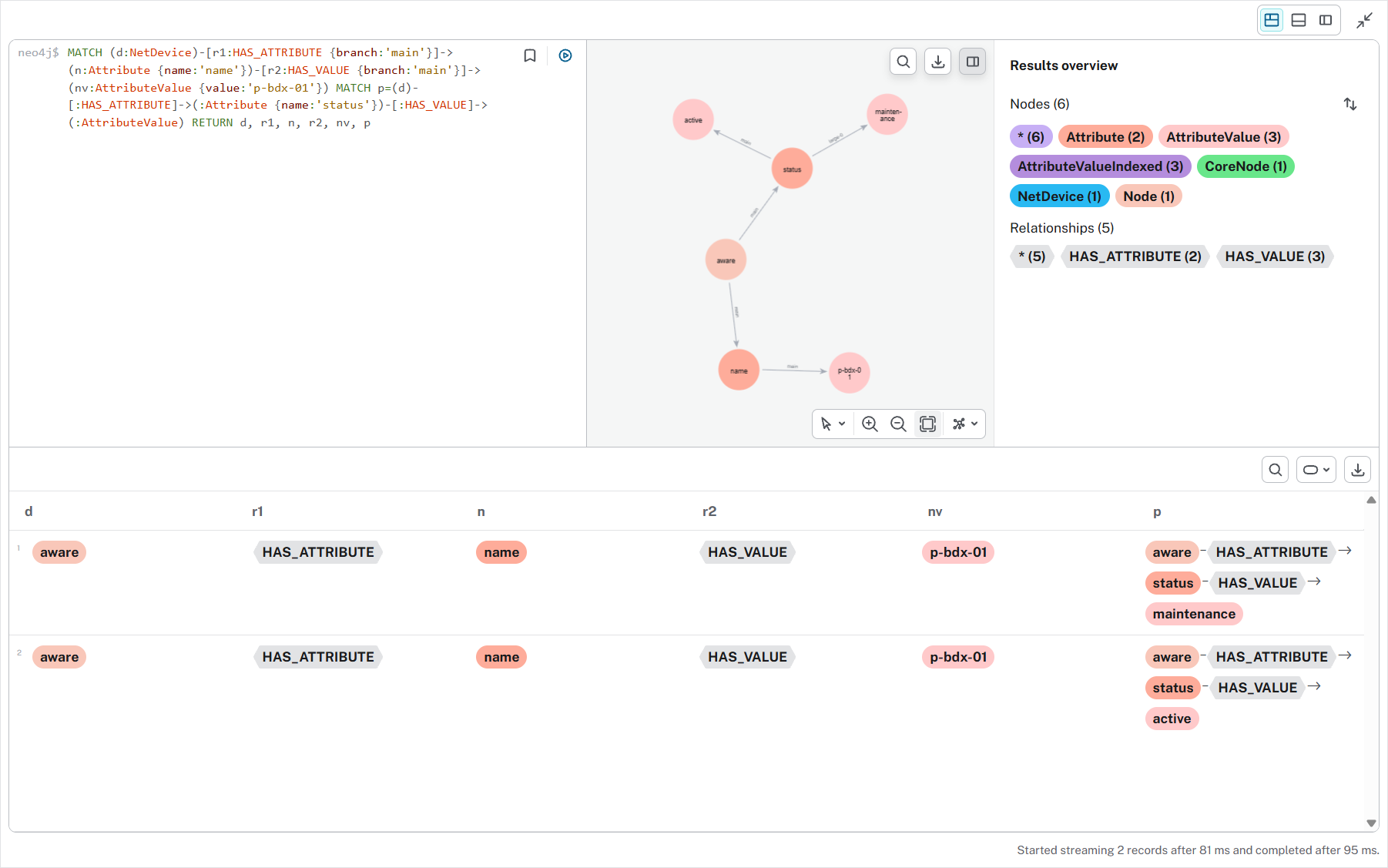
So when I set the status of p-bdx-01 to maintenance on a branch, Infrahub does not copy the router. It adds one HAS_VALUE edge, tagged with the branch name, from the existing status attribute to the existing maintenance value. The main edge stays untouched. A query on main sees active; a query on the branch sees both edges and the branch edge wins.
As in Git, a branch does not see changes made on main after it started. It reads main frozen at branched_from, a timestamp on the Branch vertex, so queries, generators and checks on the branch all read that old main. Infrahub does not tell you that main moved; you rebase to catch up, which moves branched_from to the rebase time. I show it below.
You can see all this in Neo4j directly. Infrahub never needs you there, and you must never write there, but reading is the best way to understand the model:
MATCH (d:NetDevice)-[:HAS_ATTRIBUTE {branch: 'main'}]->(:Attribute {name: 'name'})
      -[:HAS_VALUE {branch: 'main'}]->(:AttributeValue {value: 'p-bdx-01'})
MATCH (d)-[:HAS_ATTRIBUTE]->(a:Attribute {name: 'status'})-[r:HAS_VALUE]->(v)
RETURN r.branch, v.value, r.from, r.to
"large-0", "maintenance", "2026-10-27T18:15:22.144336Z", NULL
"main",    "active",      "2026-10-27T18:04:02.243993Z", NULL
History and time travel
Nothing is overwritten. When a value changes on main, the old edge gets a to timestamp and a new edge starts. The graph keeps the full history, and any query accepts a point in time. Here is rr-lys-01 on main at three moments of this lab, with ?at= on the GraphQL endpoint:
That is a real strength for operations: "what did the source of truth say during last night's incident?" is one query.
The other side: nothing trims the history of main. Version 1.11.9 has no retention setting and no command to drop the versions older than N days, so every change stays in the graph. Only branch history can go: deleting a branch removes its edges and their history for good, and a rebase drops the older history of the branch changes. The two cleanup commands do not touch the data history: infrahub db delete-diffs removes stored diffs, and infrahub tasks flush flow-runs --days-to-keep 30 removes old task runs from the Prefect database. Size the disk for the history that you will keep, not for the current data.
Not all data is branched
A schema element has a branch support mode:
- aware (the default for your data): follows the model above.
- agnostic: stored once on the global branch and visible on every branch at once. Accounts, tokens and resource pool reservations work like this, so two branches cannot take the same IP address or the same number from a pool.
- local: stays on the branch where it was set and is never merged.
Measurement 1: creating a branch
Infrahub runs its background jobs with Prefect, an open-source Python workflow engine. An API call that creates, merges or rebases a branch does not do the work itself: it submits a Prefect flow, the Prefect server (the task-manager container) queues it and keeps its state, a task-worker container runs it, and the client waits for the result. So every branch operation has a queue time and a run time, and I measured both.
The branch creation flow checks that the name is free under a distributed lock, takes a local schema lock, copies the schema of main in memory, saves the Branch vertex, adds the branch to the registry, and sends an event. Then every API and worker process receives a "refresh registry" message on RabbitMQ and loads the new branch. I saw those messages in the logs of all six processes for each branch.
I created branches with the SDK (client.branch.create(..., sync_with_git=False, wait_until_completion=True)), counted nodes and relationships before and after each one, and read the queue time and the run time of each flow from the Prefect API.
| Graph | Branches | Client time, median / max | Flow queue, median / max | Flow run, median / max | Graph added per branch |
|---|---|---|---|---|---|
| 49k nodes | 25 | not recorded | 0.82 s / 2.2 s | 0.50 s / 1.4 s | 1 node, 1 relationship |
| 151k nodes | 25 | 2.2 s / 3.2 s | 0.86 s / 1.5 s | 0.53 s / 0.79 s | 1 node, 1 relationship |
What it says:
- One node and one relationship, every time. The new
Branchvertex and itsIS_PART_OFlink to the root. No data is copied. On disk, 25 branches added 229 KB to a 165 MB store, and most of that is page allocation. - The size of the graph does not matter. A median of 0.50 s against 0.53 s for three times more data. The difference between the flow time and the client time is the queue and the SDK polling for the result.
Memory was my other suspect, because every process keeps one schema per branch. It does not matter in practice:
| Container | 1 branch | 26 branches |
|---|---|---|
| API server (4 workers) | 1.524 GiB | 1.530 GiB |
| Task worker 1 | 402.7 MiB | 408.8 MiB |
| Task worker 2 | 385.1 MiB | 392.5 MiB |
| Neo4j | 1.756 GiB | 1.757 GiB |
Compared to NetBox Branching
NetBox Branching takes the opposite approach, because NetBox stores its data in PostgreSQL, a relational database. A new branch is a new PostgreSQL schema, and provisioning it copies every branch-aware table of main into it: in v1.2.0, INSERT INTO branch.table SELECT * FROM main.table for each table under one snapshot, then a rebuild of the constraints and indexes, then the triggers. That is almost all the network data. Users and other non-branching models stay in main, and the change log starts empty.
So a NetBox branch costs time and disk in proportion to the data: a large database means a long provisioning and a full second copy of the data for each open branch. The plugin documentation says it too: its provision_workers setting copies the tables and builds the indexes in parallel to cut "provisioning time on multi-GB databases". I did not measure it here. In return, a NetBox branch is a plain set of tables, so reads inside it cost nothing more, and archiving a merged branch drops its schema and gives the space back.
Measurement 2: reading a branch
The read rules above add work to every query on a branch: more edges to consider, and an ordering to find the winner. I ran the same query, all 1,064 routers of the large graph with three attributes each, seven times on three branches:
| Branch | Median | Min | Max |
|---|---|---|---|
main |
1.06 s | 0.98 s | 2.60 s |
| fresh branch, no change | 1.11 s | 0.96 s | 3.14 s |
| branch with 1,000 of the 1,064 routers changed | 1.15 s | 0.98 s | 2.49 s |
The median moves by 4% on a fresh branch and 9% when almost every object differs, less than the spread between two runs on main (0.98 to 2.60 s). For a source of truth that automation reads all day, reading a branch costs the same as reading main.
Measurement 3: editing, diff and merge
An empty branch is not the interesting case. The real question is what a branch with many changes costs. On the large graph, I created a branch, changed the owner of N application services, refreshed the diff (DiffUpdate), merged it (BranchMerge), and counted the graph after each step.
| Changes | Edit | Added by the edit | Diff | Added by the diff | Merge | Added by the merge |
|---|---|---|---|---|---|---|
| 10 | 1.5 s | 10 edges | 13.3 s | 32 nodes, 31 edges | 22.3 s | 10 edges |
| 100 | 5.1 s | 100 edges | 8.8 s | 302 nodes, 301 edges | 16.3 s | 100 edges |
| 1,000 | 41.0 s | 1,000 edges | 10.6 s | 3,002 nodes, 3,001 edges | 43.0 s | 1,000 edges |
The edit
One edge per changed attribute. The 2 extra nodes are the new values, for example team-noc-1000, shared by all the services that hold it. 1,000 edits took 41 s with an SDK batch at concurrency 2, which is the speed of the API mutations, not of the branch.
The diff
A diff is not computed on the fly when you open a page. A flow computes it and stores it in the graph: one DiffRoot for the branch, a partner DiffRoot with the changes of main over the same time range (Infrahub compares the two to find conflicts), and per changed attribute one DiffNode, one DiffAttribute and one DiffProperty, which holds the old and the new value. That is the "3 nodes and 3 edges per change" in the table: a stored diff weighs three times more than the change itself.
Infrahub does not compute the diff at each change: a flow updates it when a proposed change runs its checks, when you press Refresh diff, before a merge or a rebase, and after another branch merges into main. Each update calculates only the time since the last one.
The time stayed around 10 s from 10 to 1,000 changes, so at this scale it is mostly fixed overhead.
The diff also stores the conflicts: under the DiffProperty, a DiffConflict vertex keeps both values and the side you chose. That is why the diff must exist before a merge. A branch without a diff costs nothing: my 50 open benchmark branches had no proposed change, so the refresh after each merge (INFRAHUB_DIFF_UPDATE_AFTER_MERGE) skipped them.
The merge
A merge is the most guarded operation. The flow:
- takes the global merge lock, so only one merge or rebase runs at a time on the whole instance;
- blocks writes on the source branch and on
main(a write getsMERGE_IN_PROGRESS, HTTP 423); other branches stay writable; - refreshes the diff and checks the conflicts and constraints again against the current
main, because another branch may have merged since the review; - writes the final value of each change on
main: "latest value wins", the history inside the branch does not travel; - closes the old
mainedges with atotimestamp, somainkeeps its history; - marks the branch
MERGED, read-only for good.
The table shows one new main edge per change, and a time that is mostly fixed: 10 changes took longer than 100.
A crashed merge needs an operator
A merge is not one database transaction: if the worker dies in the middle, the branch goes to MERGE_FAILED, main stays write-blocked, and an administrator runs infrahub recover merge to revert every main write since the merge started. A crashed merge is an operator task, not a retry.
The branch keeps its own edges until you delete it: after the merge of bulk-1000, one service owner had three edges, the old and the new value on main, and the new value on the branch.
Measurement 4: deleting a branch
Removing a branch is always more work than creating one, and Infrahub is no exception. I deleted 50 benchmark branches with the SDK:
| Branches | Time | Per branch |
|---|---|---|
| 25 (while I was using the UI) | 11 min 40 s | 28 s |
| 25 | 6 min 30 s | 16 s |
A delete takes 16 to 28 s, against about 2 s for a create, even for an almost empty branch. A create writes one vertex; a delete must find and remove every edge of the branch, clean the vertices that only the branch used, release branch-agnostic values that nothing reaches any more, and refresh every registry. The graph went back to exactly the counts before the branches, edges included. The store file did not shrink: Neo4j keeps the space and reuses it later.
If your automation creates a branch per change, plan for the delete side, or set INFRAHUB_DELETE_BRANCH_AFTER_MERGE and let Infrahub delete each branch after its merge.
The Git-style actions in practice
The Git words map to Infrahub, but not one to one:
| Git | Infrahub | What is different |
|---|---|---|
git branch |
Create branch | Always from main, no branch of a branch. "Sync with Git" also pushes it to the read-write repositories |
| commit | Any change | There are no commits. Each change is a timestamped edge; there is no message and no unit to revert |
git diff |
Data tab of a branch or proposed change | Computed by a flow and stored in the graph. Refresh it with the button or DiffUpdate |
| merge request | Proposed change | Diff, checks, comments, reviewers, approvals |
git rebase |
Rebase | Moves branched_from to now, with no replay. Only the latest value of each branch change survives |
git merge |
Merge | "Latest value wins". Global lock, main write-blocked during the merge, branch frozen after |
| merge conflict | Conflict | Per attribute or per relationship. You pick a side; there is no text merge |
| cherry-pick, revert | none | No partial merge, no revert of a merged change: you write the inverse change on a new branch, see Rollback |
A branch and an edit
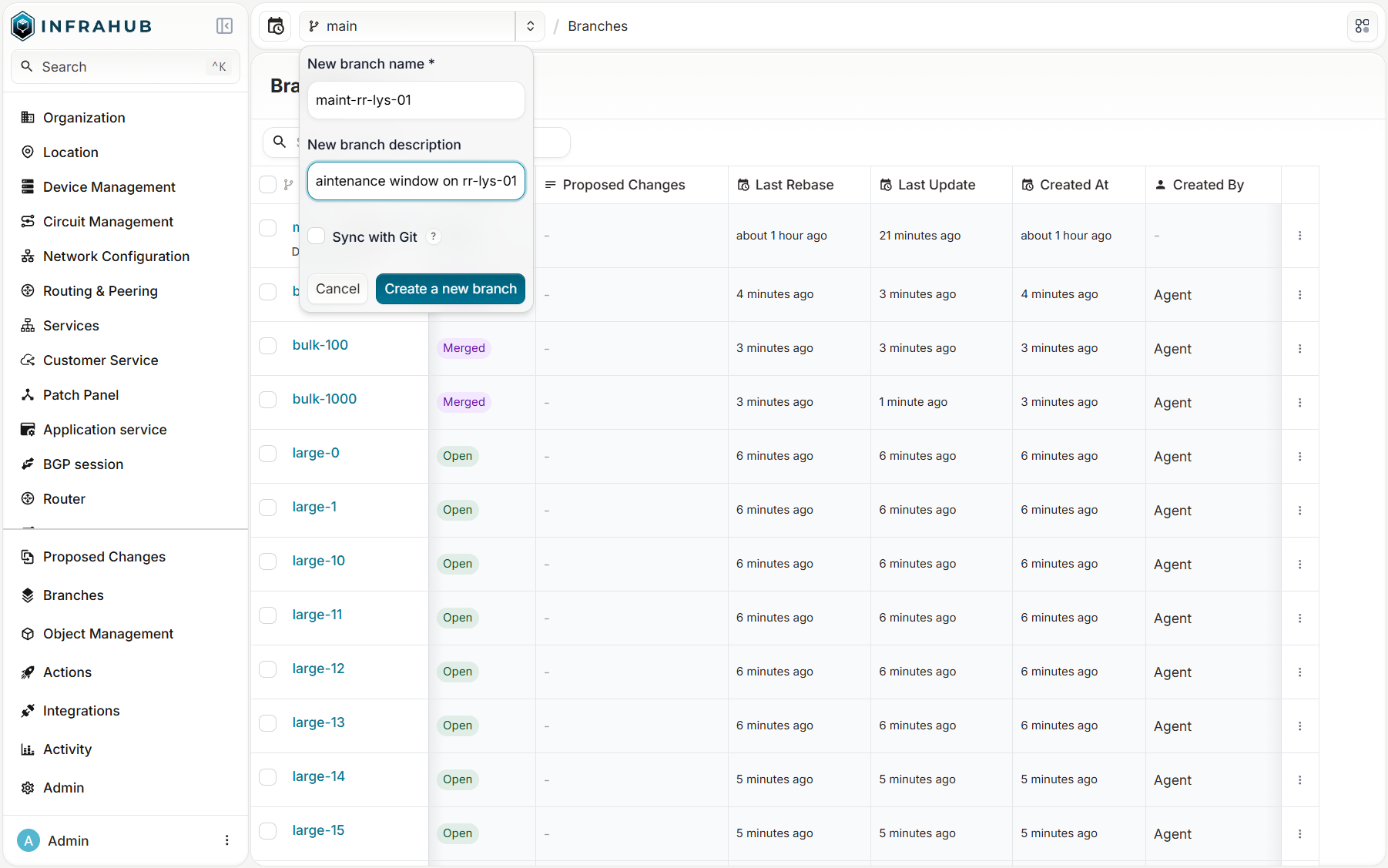
I created the branch maint-rr-lys-01 from the branch selector and set the status of rr-lys-01 to maintenance. The branch name is on every screen and in every form, so you always know where you write.
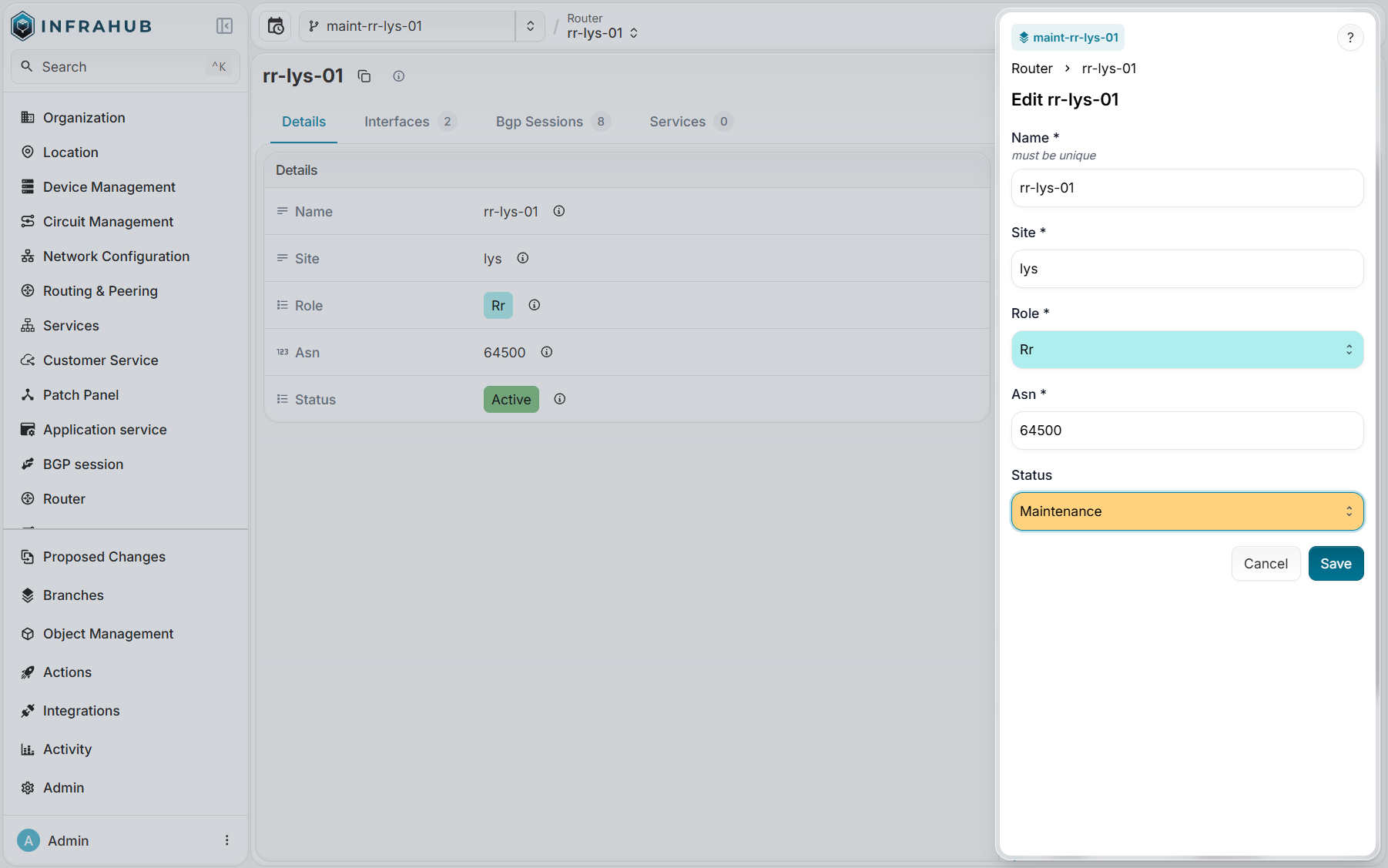
The API confirms the isolation: main returned active, the branch returned maintenance.
The proposed change and its diff
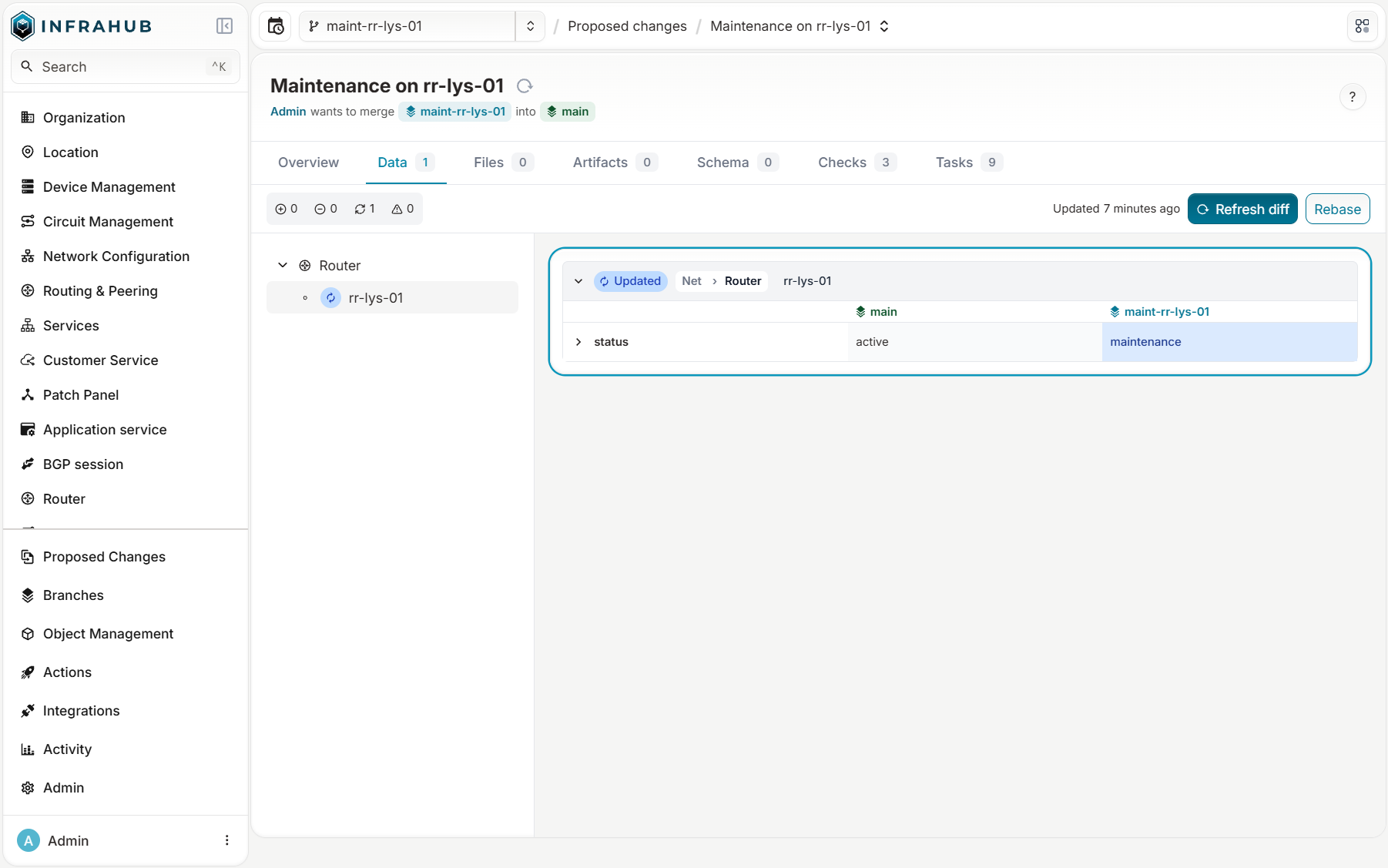
Then I opened a proposed change from the branch to main. Its Data tab shows the stored diff:
A conflict
While the proposed change was open, another operator set rr-lys-01 to down directly on main. The diff in the page did not change by itself. After "Refresh diff", Infrahub showed the conflict on the attribute, with the history of main (active then down), the branch value, and a choice of side:
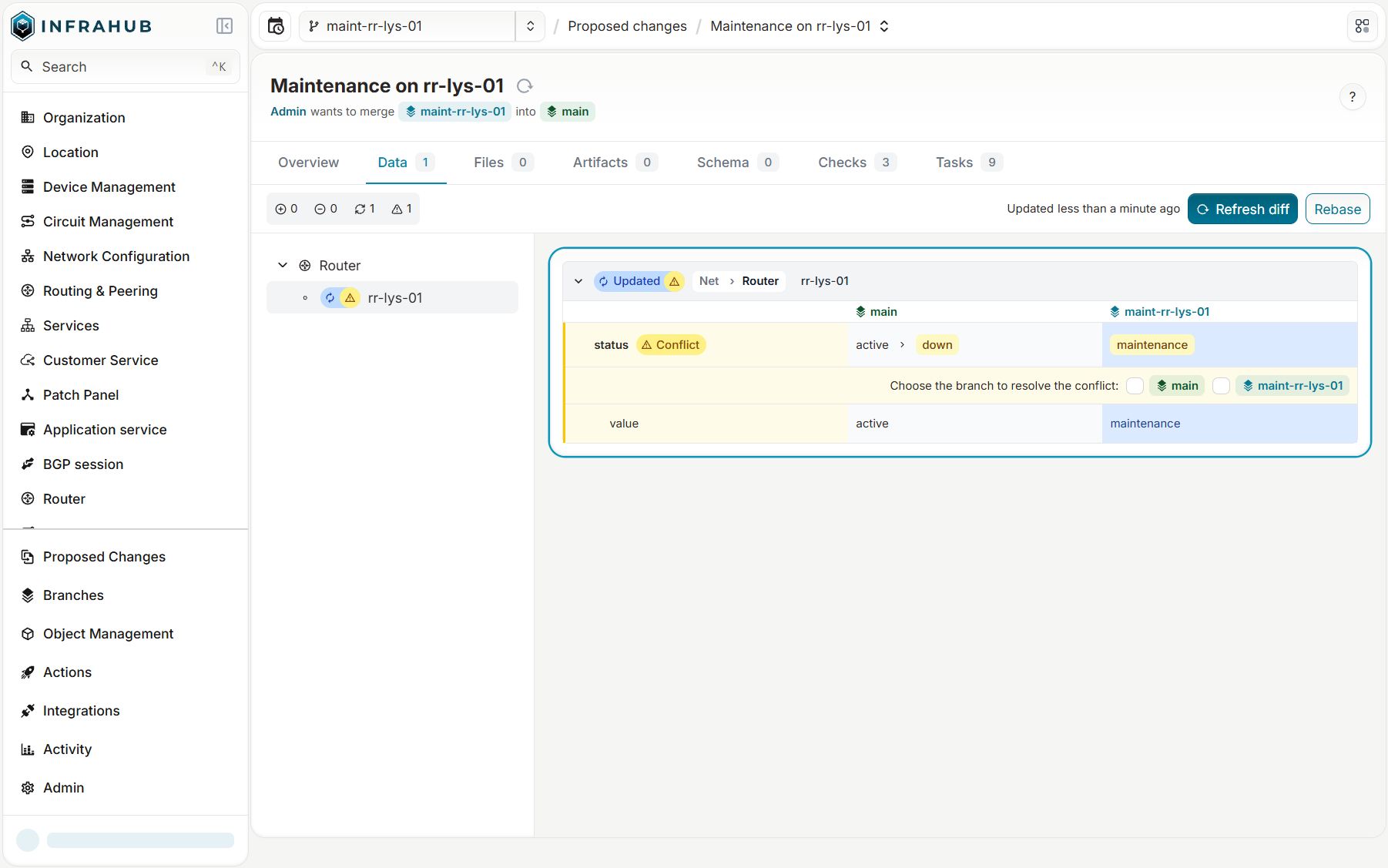
I kept the branch value. The choice is stored with the diff and applied at merge time. Not every conflict can be solved this way: if one side deleted an object and the other changed it, no choice of side works, and the merge stays blocked until the data agrees on both branches.
Rebase
To see the rebase, I created a branch rebase-demo, then changed the owner of svc-pe-par-01-1 on main. The branch kept returning the old owner: it reads main as of its branched_from. The Rebase button moved branched_from to now, and the branch returned the new owner.
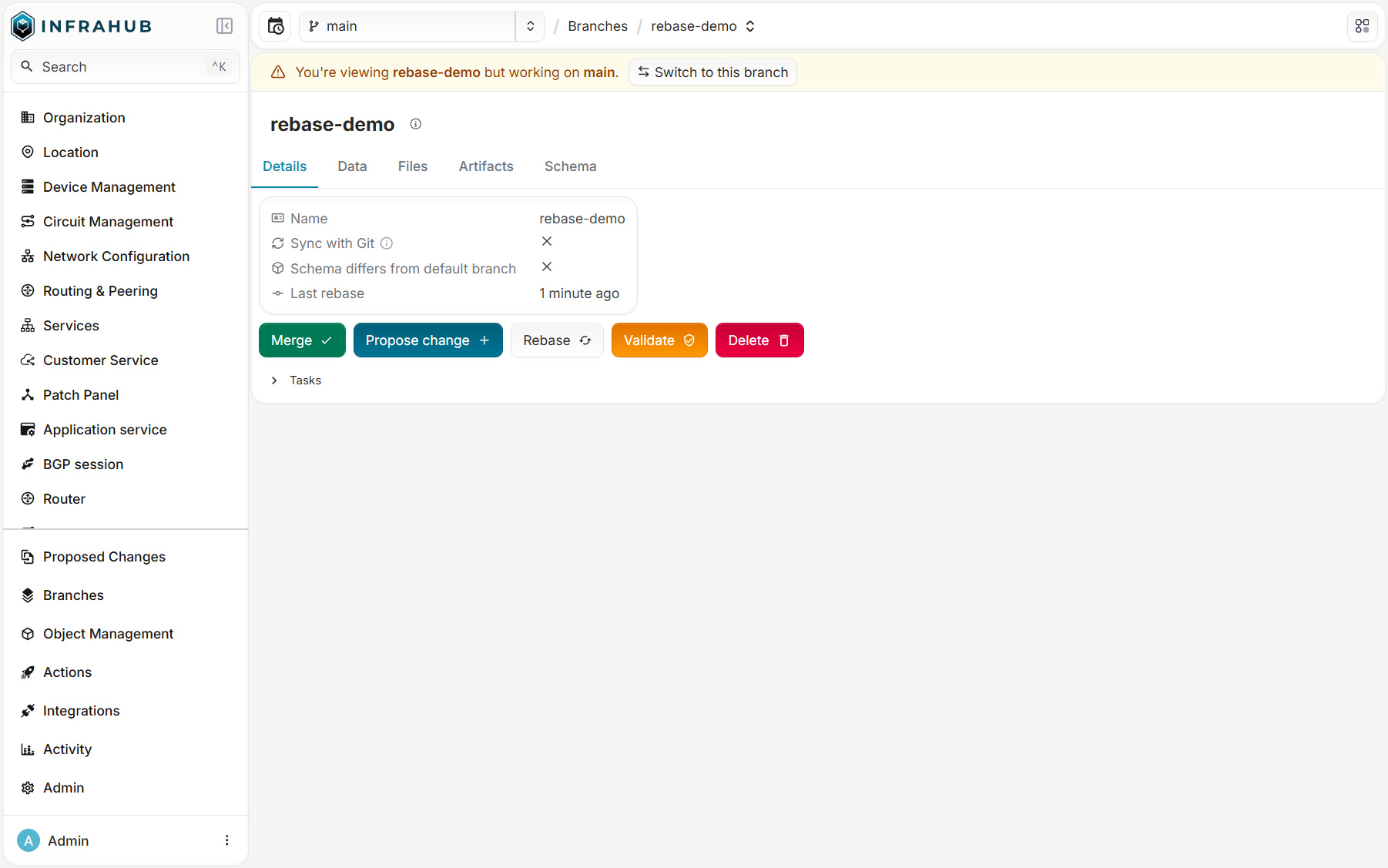
A rebase takes the same global lock as a merge, checks the conflicts and the constraints first, and refuses if a conflict needs a decision that a rebase cannot apply (it always keeps the branch side). So the right habit is the one from Git: rebase before you ask for a review, and again after another branch merges.
CI on a branch: custom checks
The proposed change is the merge request of Infrahub, and its validators are the CI. Some are built in:
- Data Integrity: the conflicts, and whether each one has a decision.
- Schema Integrity: the schema constraints (uniqueness, required values) on the data the merge would produce.
- Artifacts, Generators, Repository: the configuration artifacts and generators defined in your repositories, run on the branch data.
And the user checks, which are yours. A check is a GraphQL query plus a Python class, stored in a Git repository that Infrahub imports. A global check runs once against the whole branch; a targeted check runs once for each object of a group, with that object's values as query variables. A failing check blocks the merge.
The rule
On the branch maint-rr-lys-01, rr-lys-01 goes into maintenance. In the lab, every PE has two iBGP sessions: one to its local RR and one to the RR of Paris (rr-par-01), or of Lyon (rr-lys-01) for the Paris PEs. The rule I want: no PE may drop below two active route reflectors.
The schema makes this rule checkable. There is one BGP session object per router, and the peer relationship links the two ends, so a PE session finds the route reflector session at the other end, and the device behind it.
The check
The check lives in a Git repository with three files:
---
queries:
  - name: pe_route_reflectors
    file_path: queries/pe_route_reflectors.gql

check_definitions:
  - name: pe_route_reflector_redundancy
    class_name: RouteReflectorRedundancy
    file_path: checks/route_reflector_redundancy.py
query pe_route_reflectors {
  NetDevice(role__value: "pe") {
    edges {
      node {
        name { value }
        bgp_sessions {
          edges {
            node {
              status { value }
              peer {
                node {
                  ... on NetBgpSession {
                    device { node { ... on NetDevice { name { value } status { value } } } }
                  }
                }
              }
            }
          }
        }
      }
    }
  }
}
from typing import Any

from infrahub_sdk.checks import InfrahubCheck

MIN_ROUTE_REFLECTORS = 2


class RouteReflectorRedundancy(InfrahubCheck):
    query = "pe_route_reflectors"

    def validate(self, data: dict[str, Any]) -> None:
        for edge in data["NetDevice"]["edges"]:
            pe = edge["node"]
            active = []
            for session in pe["bgp_sessions"]["edges"]:
                peer = session["node"]["peer"]["node"]
                if session["node"]["status"]["value"] != "established" or not peer:
                    continue
                rr = peer["device"]["node"]
                if rr["status"]["value"] == "active":
                    active.append(rr["name"]["value"])
            if len(active) < MIN_ROUTE_REFLECTORS:
                self.log_error(
                    message=f"{pe['name']['value']} keeps {len(active)} active route reflector(s): {', '.join(active) or 'none'}",
                    object_id=pe["name"]["value"],
                    object_type="NetDevice",
                )
The query reads every PE, its BGP sessions, and through peer the status of the router at the other end. A PE fails only if it drops below two active route reflectors, so the check measures the impact of the change, not only what it touches. You can run it locally with infrahubctl check pe_route_reflector_redundancy --branch=<branch> before you push it.
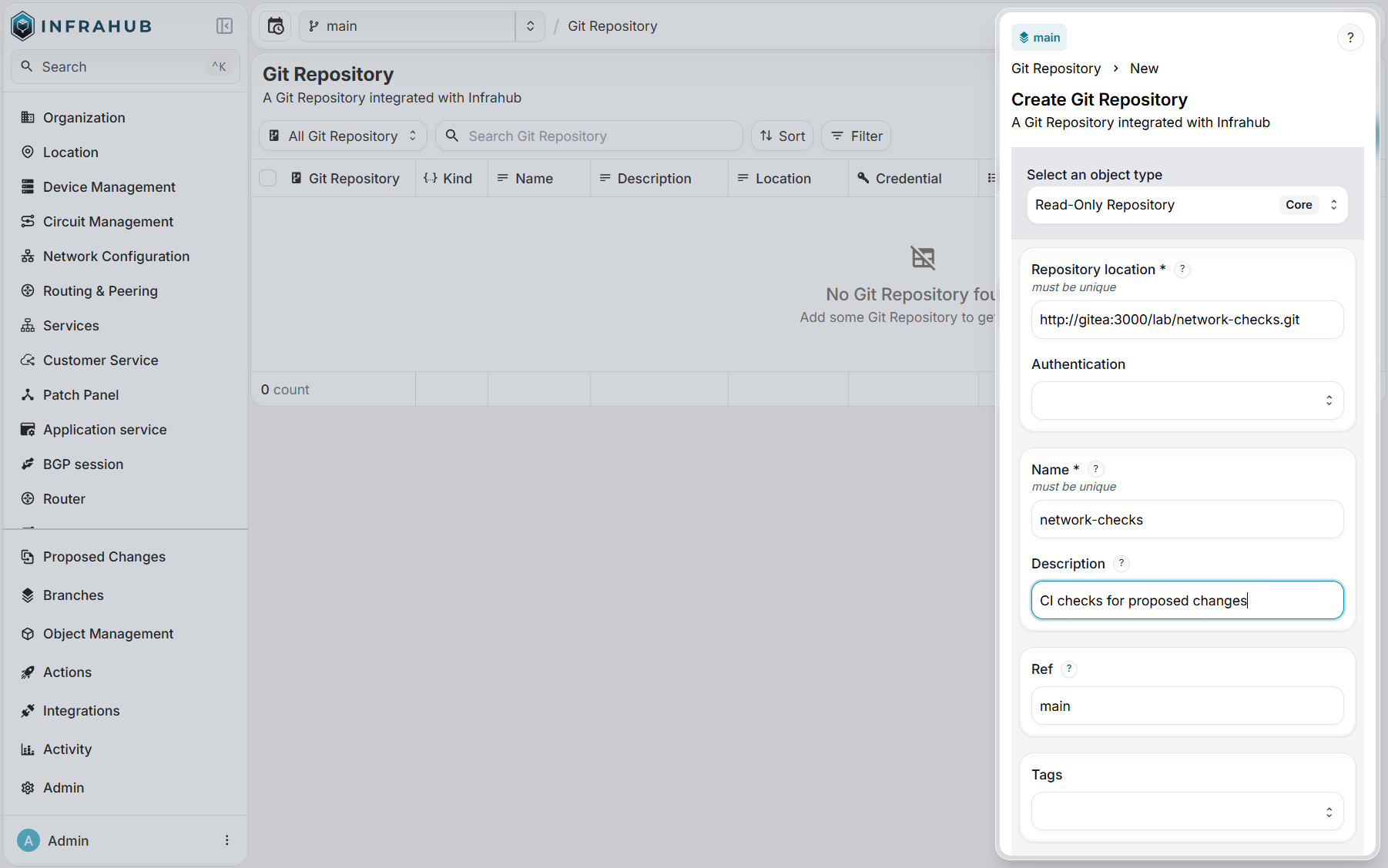
I added the repository in Integrations, Git Repositories, as a read-only repository. A read-only repository stays on one commit and imports its content: it does not follow new commits on its Git branch, and you set the new commit on the repository object, in the UI or the API, to import it. A read-write repository also gets a Git branch for every Infrahub branch created with "Sync with Git". Infrahub imported the check definition within a minute.
The gate
On the proposed change of maint-rr-lys-01, the check ran next to Data Integrity and Schema Integrity, took 34 s, and failed. It names the 8 PEs that peer with rr-lys-01:
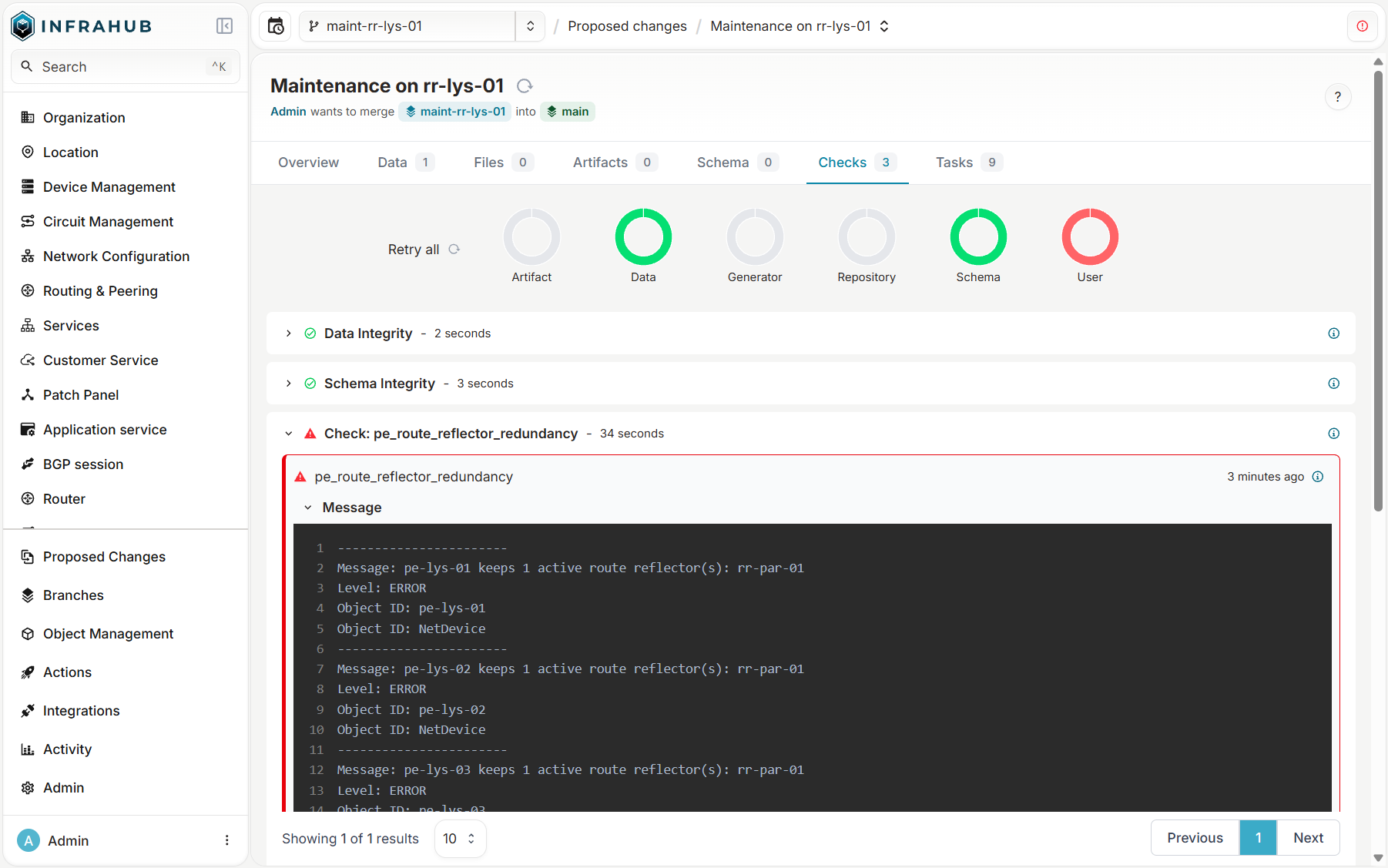
The Merge button stays clickable, but the merge flow refuses it:
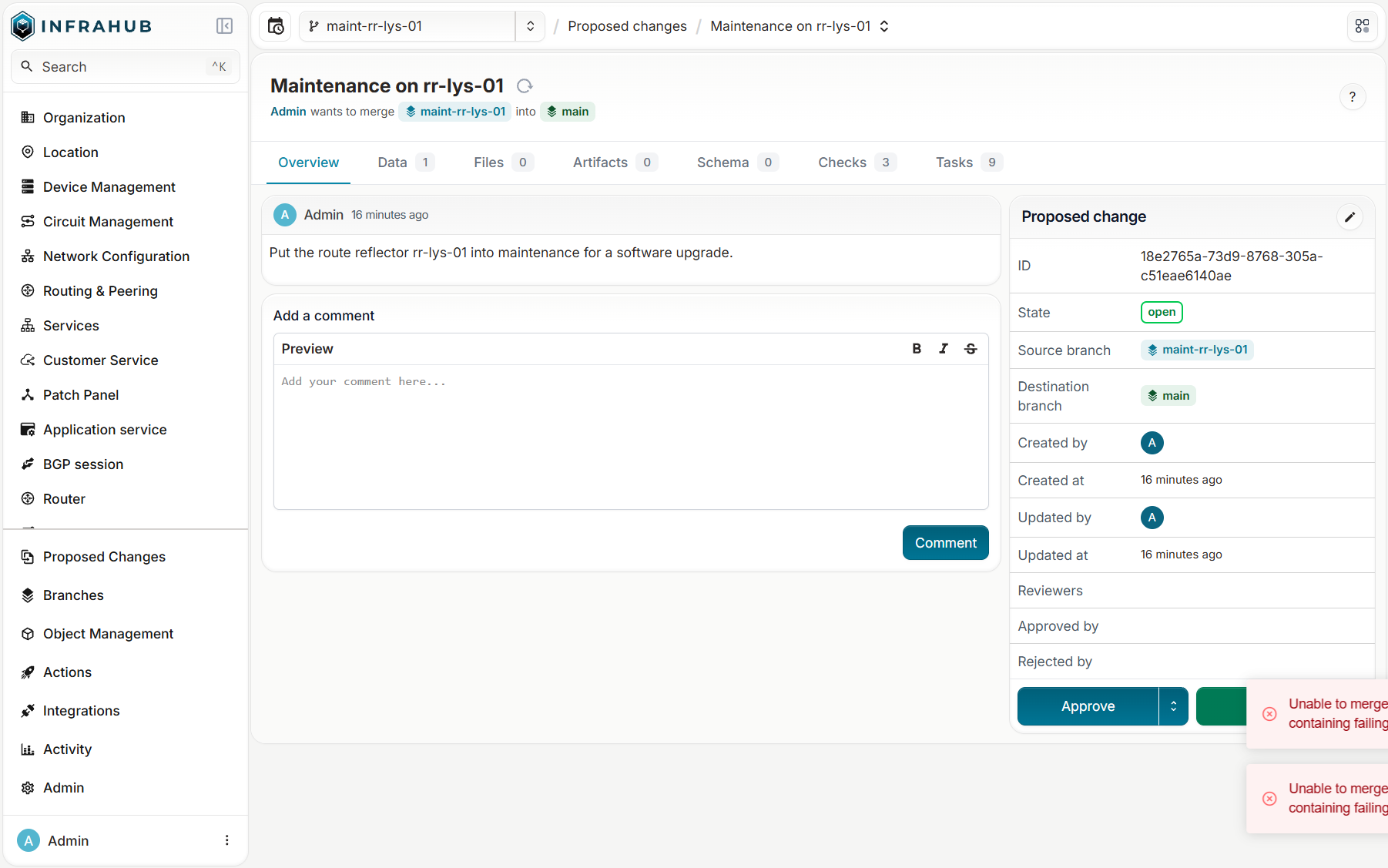
That is the behavior I want from CI. The fix belongs in the change itself: on the same branch, I gave each of the 8 PEs a temporary session to a third RR, rr-mrs-01. "Retry all" ran the check again: it passed, and the merge went through.
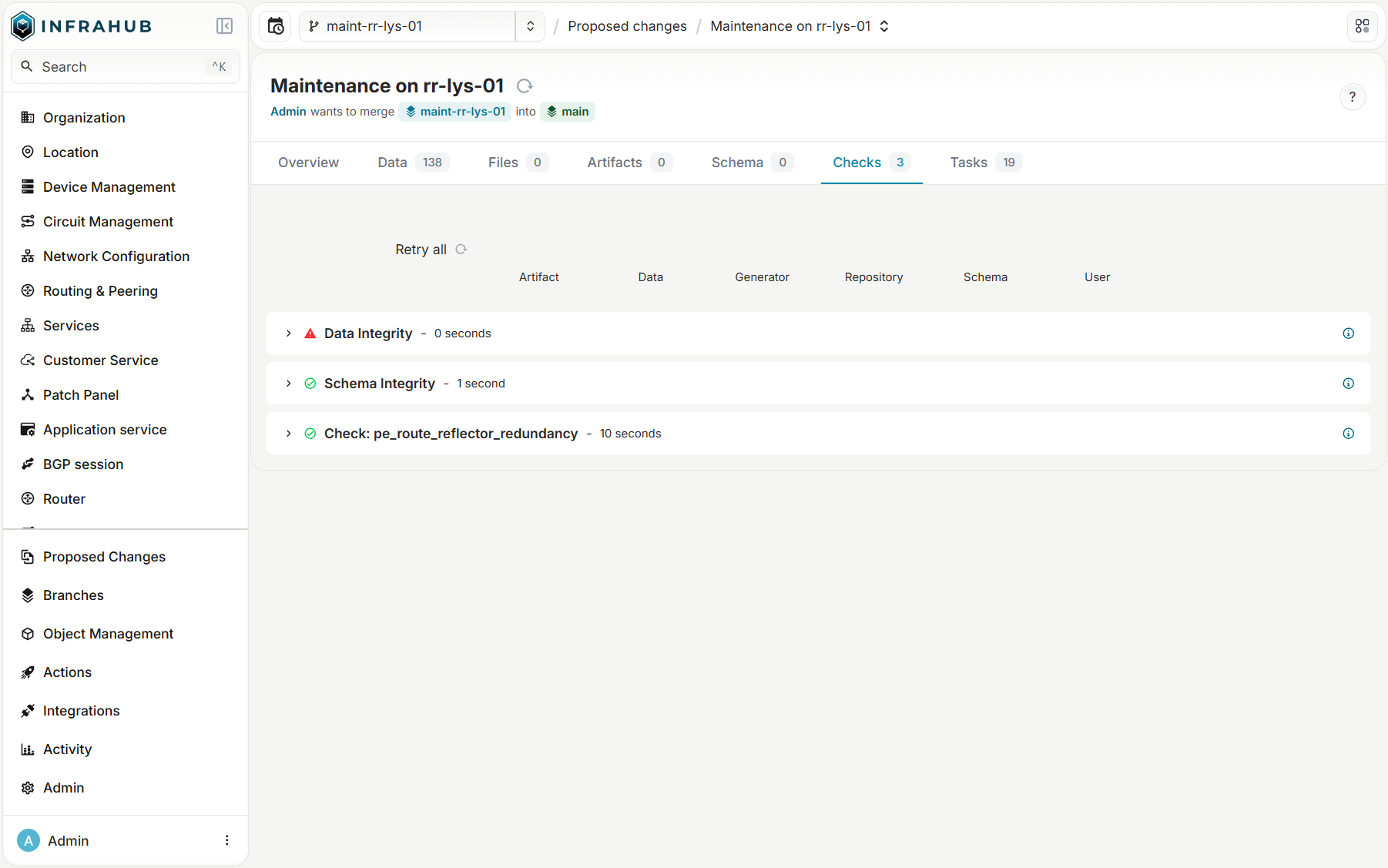
Data Integrity stays red: it still lists the status conflict of rr-lys-01, resolved earlier in favor of the branch. A conflict with a decision does not block the merge; only a conflict without one does.
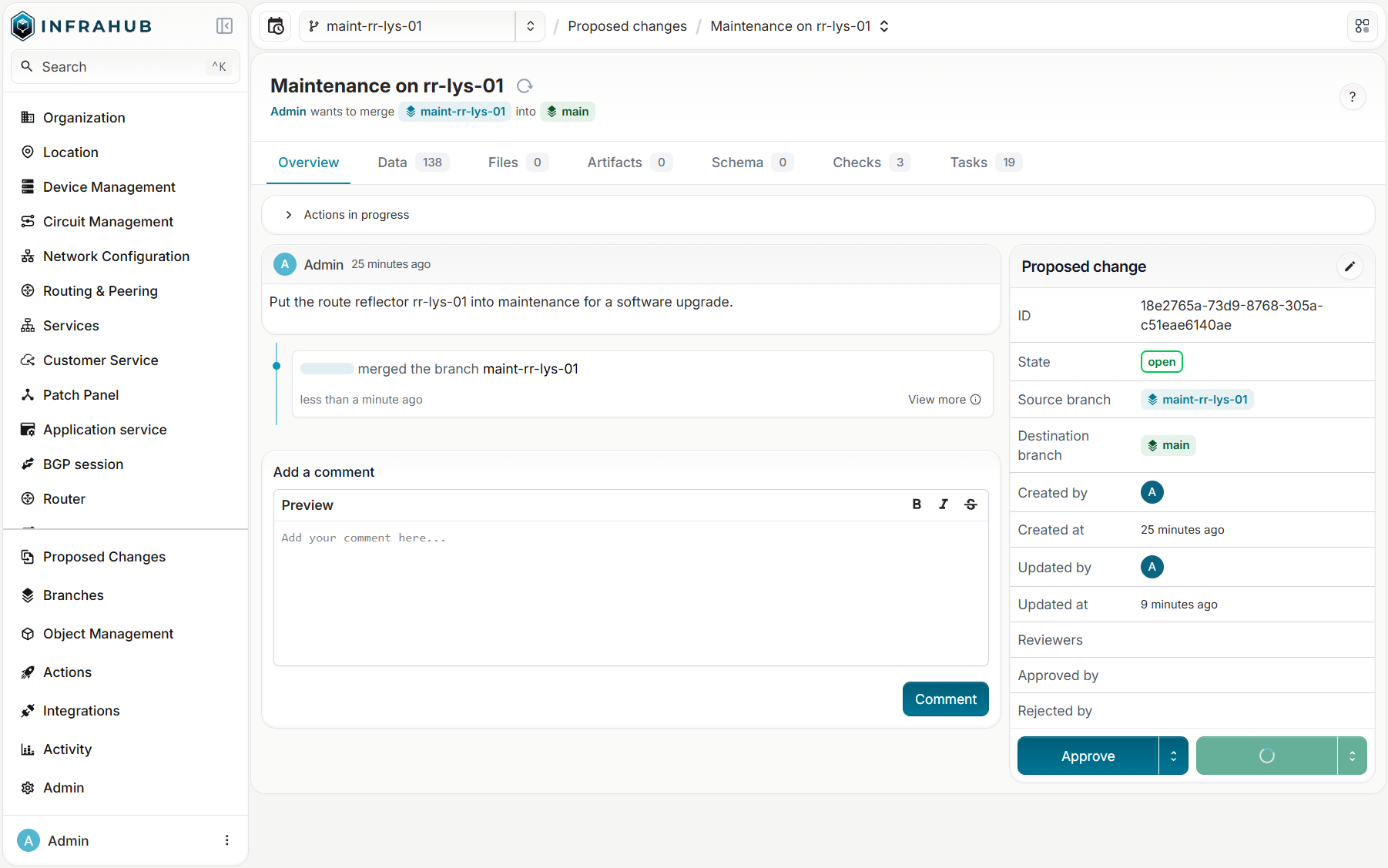
On main, rr-lys-01 is now in maintenance (the branch side of the conflict won), the backup sessions to rr-mrs-01 exist, the proposed change is merged and the branch MERGED.
What about a GitLab pipeline?
Checks run inside Infrahub, on its task workers. If you want an existing GitLab CI in the loop, there are hooks, but I did not test them:
- Webhooks send events to an external URL. The useful ones here:
infrahub.branch.created,infrahub.branch.rebased,infrahub.branch.merged,infrahub.proposed_change.approved,infrahub.proposed_change.merged,infrahub.validator.started,infrahub.validator.passed,infrahub.validator.failed, and the node events. A custom webhook passes the event through a transformation, so you can build the payload that the GitLab pipeline trigger API expects. Note that proposed change events are emitted on the default branch, whatever their source branch. - A check is Python. It can call anything the worker can reach (a GitLab pipeline, a REST API, a lab) and fail with
log_error. That is the way to make an external result gate the merge, since the pipeline result itself does not come back as a native validator.
Rollback: what if I messed up?
A check stops only what a rule covers. Here is a change that no rule of my lab covers, and how to take it back once it is on main.
The mistake
A cleanup meant for one decommissioned router had a filter that matched all of Lyon: it set three services to low criticality and deleted svc-pe-lys-02-2, a critical one. No rule covers this, so every check passed and the change was merged.
In Git, git revert would undo the merge. Infrahub 1.11.9 has no revert: no button, no mutation, no command. infrahub recover merge only cleans up a merge that crashed half-way. A rollback in Infrahub is a new change, and the history holds everything needed to write it.
The history keeps everything
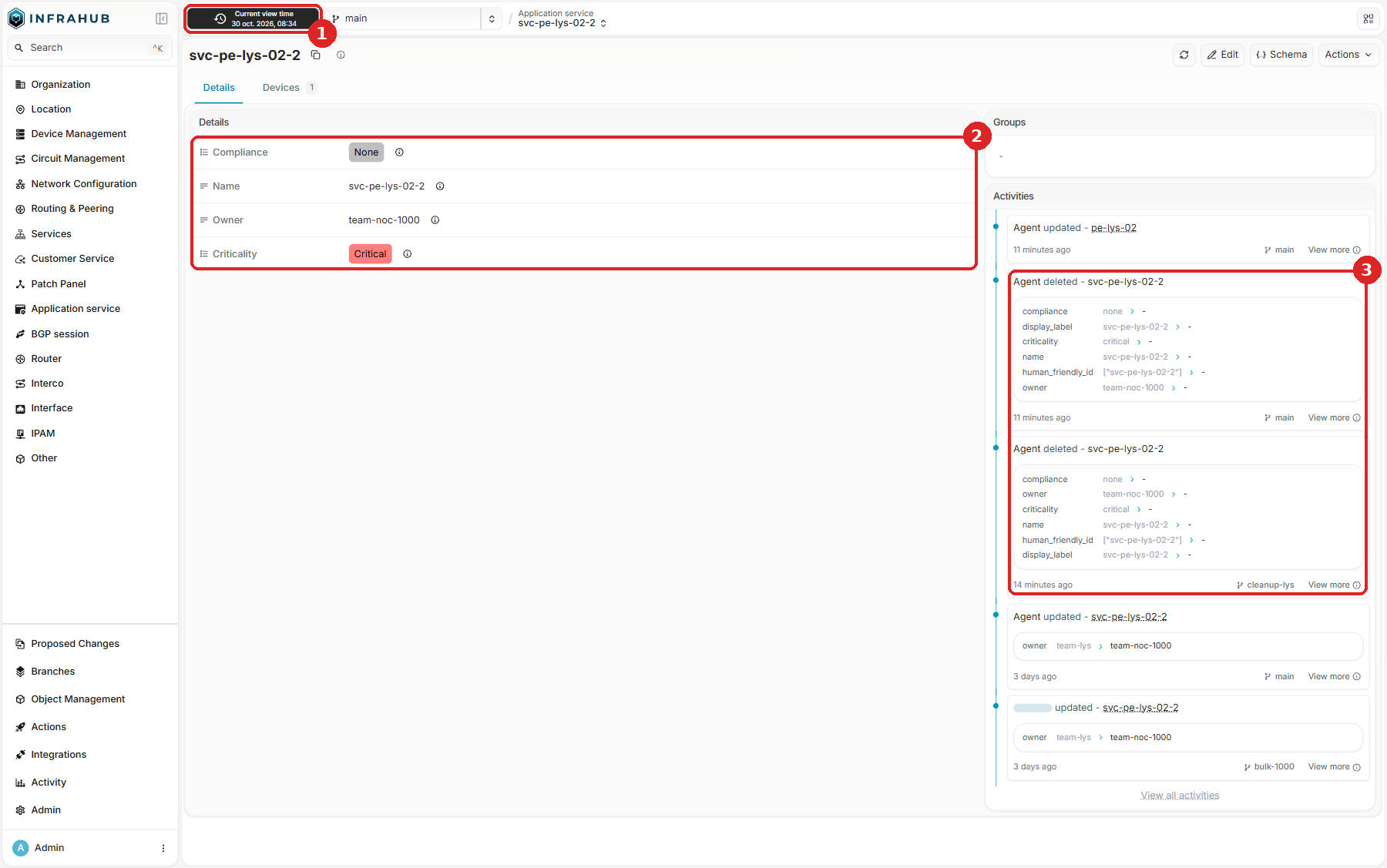
Nothing was overwritten, and the UI shows it in three places:
- The time selector, at the top left: set it to just before the merge (here in local time).
- The values at that time: the deleted service is still there, critical.
- The activity of the object: who deleted it, on
cleanup-lysand then onmainwith the merge, and every value it had.
The rollback is a change forward
A rollback takes four steps, and the lab has a script for the first three (scenarios/rollback.py):
No automatic rollback in Infrahub 1.11.9
Infrahub has no revert of a merged change: no button, no mutation, no command. The rollback code inside Infrahub only cleans up a merge that crashed half-way (infrahub recover merge). To undo a merged change, you need your own script, or you rebuild the old values by hand.
- Find what changed on
main. A diff ofmainwith itself, between a time before the merge and a time after it (DiffUpdate, thenDiffTree), lists the objects that the merge touched. - Read
mainas it was before. Every query accepts a point in time, so the script reads each of these objects at the time before the merge. - Write it back on a new branch. On
rollback-cleanup-lys, it sets the three criticalities back, createssvc-pe-lys-02-2again with its values and its device, and deletes any object that the merge added. - Review and merge it like any other change. The rollback goes through a proposed change, the checks run, and the reviewer sees exactly what goes back:
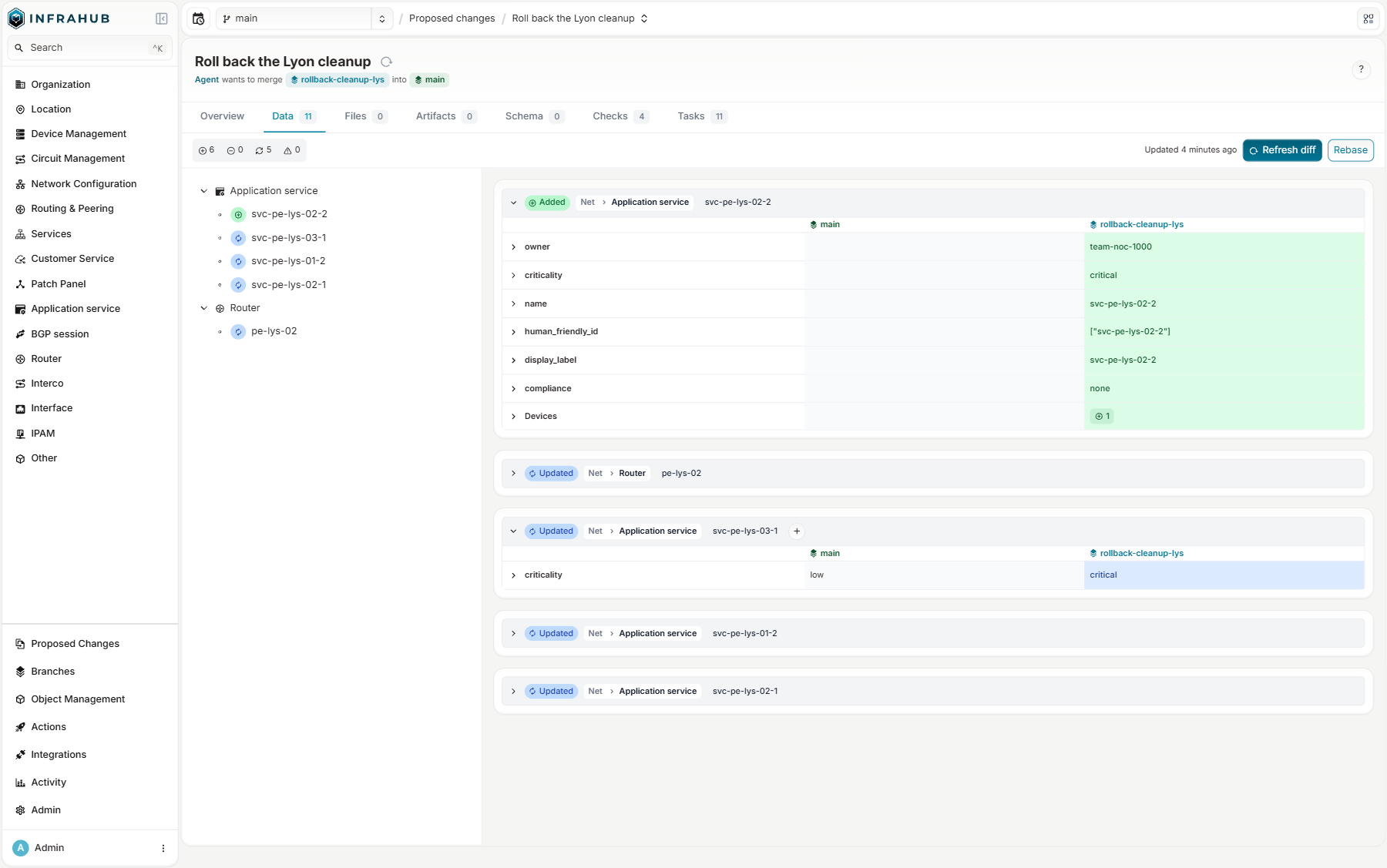
After the merge, main holds the mistake and its fix, one edge after the other:
"main", "critical", "2026-10-27T17:42:35Z", "2026-10-30T07:35:00Z"
"main", "low",      "2026-10-30T07:35:00Z", "2026-10-30T07:47:18Z"
"main", "critical", "2026-10-30T07:47:18Z", NULL
What to know before you rely on it
- A deleted object comes back with a new id.
svc-pe-lys-02-2was18e273d3…and is now18e33ebf…. The rollback rebuilds its relationships inside Infrahub, but anything outside that kept the old id (a script, another inventory, a ticket) must look it up again, by name or by human-friendly id. - A rollback writes the old values back over any later change to the same fields: read its diff before you merge it.
- It is better than a backup restore, which loses every change made since.
How NetBox stores changes and rolls them back
NetBox keeps the current data in PostgreSQL tables, and an edit overwrites the row. The history lives beside the data: every change writes an ObjectChange record to the changelog, with the action, the user, the time, and a JSON snapshot of the object before and after the change. The changelog is kept 90 days by default (CHANGELOG_RETENTION). NetBox itself has no revert: the changelog tells you what to write back, and you write it.
NetBox Branching adds a Revert button to a merged branch (since v0.3.0). It applies the inverse of the branch changes in reverse order: it creates the deleted objects again with their original attributes, sets the old values back, and deletes the objects that the branch created. The revert adds new records to the changelog and erases none. It works only while the branch schema exists: once the branch is archived, by hand or with auto_archive_days, it can no longer be reverted.
| NetBox with NetBox Branching | Infrahub 1.11.9 | |
|---|---|---|
| Where the history lives | A changelog beside the data | In the data: every edge carries its time range |
| How long | 90 days by default | No retention, never trimmed |
| Read a past state | Rebuild it from the changelog | Any query with a point in time |
| Undo a merged change | One Revert button, until the branch is archived | A new branch built from the history, by hand or by script |
What the Community edition does not give you
Everything in this post ran on the Community edition: Infrahub under the Apache 2.0 license, with Neo4j Community, as in the release compose file. OpsMill sells an Enterprise edition, and the documentation of the tested version states that both editions have the same data management features: schema, branches, proposed changes, conflicts, history, checks, artifacts and generators. The differences are in governance, operations and scale, and some of them touch exactly the workflow of this post.
Limits of the Community edition
Governance
- No enforced approvals. Reviewers can approve or reject a proposed change, but nothing requires an approval before a merge, and nothing revokes an approval when the branch changes after it (
INFRAHUB_POLICY_REQUIRED_PROPOSED_CHANGE_APPROVALSandINFRAHUB_POLICY_REVOKE_PROPOSED_CHANGE_APPROVALSare Enterprise). I merged my maintenance change with no review at all. Only the checks and the permissions stand between a branch andmain. - No LDAP. The Community edition has local accounts, OAuth2 and OIDC single sign-on, and role-based access control. LDAP sign-ins are refused with an "enterprise required" error.
- No log forwarding. The export of audit events and application logs to a SIEM over syslog is accepted in the configuration but does nothing.
Database and scale
- Sized for about 1,000 devices. That is the guidance of the Infrahub documentation for the Community edition; Enterprise targets 10,000 and more. My large graph had 1,064 routers plus the 30 devices of the demo data, so it was just above that size.
- One CPU core for Neo4j. The same documentation says that Neo4j Community runs on a single CPU core, so large merges and imports are bound by single-core performance whatever the size of the host. Enterprise runs queries and merges on several cores. All my merge, diff and delete times were measured on Community; I did not test Enterprise, so I cannot say how much faster they would be.
- No clustering, no high availability. One Neo4j instance, scaled vertically. If it stops, Infrahub stops.
- One database user. Neo4j Community has only the built-in
neo4juser, so you cannot give a read-only account to someone who wants to look at the graph as I did above. - No online backup and no forced checkpoint.
neo4j-admin database backupand thedb.checkpoint()procedure are Neo4j Enterprise features. In Community, a consistent copy is an offline dump, with the application stopped. I hit the checkpoint limit myself when I measured the store size.
Support
- Community support is Discord and GitHub, best effort, with no response time.
For a lab, a pilot or a network of up to about 1,000 devices, none of this blocks you. For a large or critical production network, it is different: nothing enforces the "four eyes" rule that most change processes require, and a single Neo4j instance gives no high availability and merges bound to one CPU core.
What to plan for
| Limit | What I saw |
|---|---|
One level of branches, always from main |
No stacked changes, no branch of a branch |
| No commits | No unit of change inside a branch, no revert of a merged change, no cherry-pick |
A branch does not follow main |
It reads main frozen at branched_from until you rebase, and nothing warns you |
| Diffs are stored | A diff weighs more than the change itself, and flows refresh it, sometimes by hand |
| Merges and rebases are serialized | One global lock for the instance, and each merge is slow |
| Deletes are slow | Slower than a create, even for an empty branch |
| History is never trimmed | No retention for main: only a branch delete or a rebase removes history |
| A crashed merge needs an operator | MERGE_FAILED and infrahub recover merge |
| No revert | A rollback is a new branch built from the history; deleted objects come back with a new id |
| Everything heavy is a Prefect flow | The client sees queue time and SDK polling on top of the work |
What I take away
The branch model holds up. A branch is a filter on a temporal graph, not a copy: it costs almost nothing to open and it reads as fast as main. The temporal edge model is elegant, and it gives history and time travel almost for free: "what did the source of truth say last night?" is one query. That is the right foundation for data that automation reads all day.
The cost sits in the life of a branch, and it is predictable. Merges run one at a time under a global lock, diffs and deletes take real work, and history only grows. A team that merges a few changes a day will not notice. A platform that opens a branch per change must be sized for merges and deletes, not for creations, and must know who recovers a failed merge.
The real gain comes from what a branch makes possible. An engineer prepares a maintenance where it cannot hurt anyone, a few lines of Python tell them before the merge that a PE would lose its last route reflector, and the change reaches the network already checked. The customers behind that PE never see the mistake, and when one still gets through, the history holds everything needed to write it back. Two conditions decide whether you get there: the schema must model the dependencies that your rules need, because Infrahub only knows what you put in the graph, and on a large or critical network, the Community edition leaves the four-eyes rule and high availability to you.
The next post follows the dependencies instead of the branches: Which services sit behind this router? Infrahub Graph Traversal.
Bugs found along the way
I reported to OpsMill each bug I hit while writing this post, and sent a fix for each one.
Issues and pull requests
| Bug | Issue | Fix |
|---|---|---|
| A check stays "in progress" forever when one of its runs fails or times out, and blocks the merge (CI on a branch) | #11277 | #11279 |
A time-range diff of main reports an object deleted by a merge as updated |
#11344 | #11348 |
A time-range diff of main reports the first value ever, not the value at the start of the range, as the previous value of a deleted object |
#11345 | #11349 |
| The same stale previous value for the properties of a removed relationship peer, found in the review of #11349 | #11358 | #11360 |
OpsMill merged the four pull requests.